

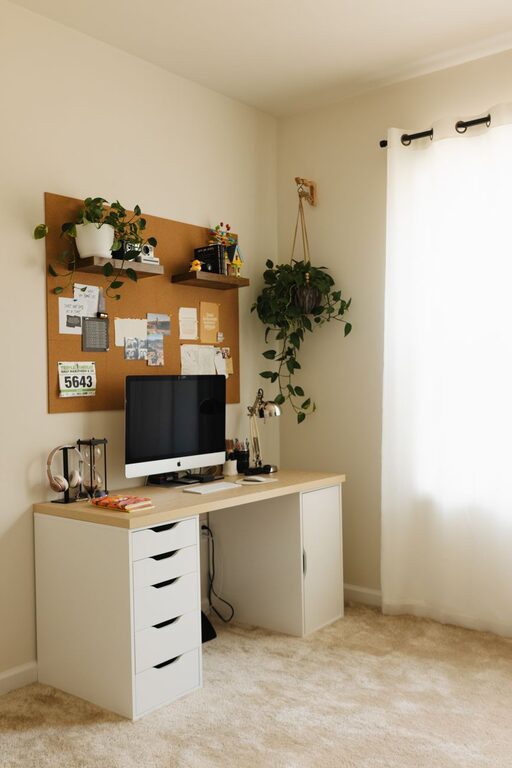
Creating a home office that is both cozy and productive can significantly improve your work-from-home experience. Whether you’re setting up a new space or refreshing an existing one, balancing comfort with functionality helps you focus while feeling relaxed. In this post, we’ll explore practical tips to design a workspace that supports your daily tasks and promotes well-being.
—
Choose the Right Location
Consider Natural Light
Position your desk near a window to take advantage of natural light. Sunlight can improve mood, reduce eye strain, and keep you energized throughout the day. If natural light is limited, invest in good quality artificial lighting that mimics daylight.
Minimize Distractions
Select a quiet area of your home, away from high-traffic zones like the kitchen or living room. A dedicated office nook or spare room can help create a mental separation between work and home life.
—
Invest in Comfortable and Functional Furniture
Ergonomic Chair
A supportive chair is critical for your health and productivity. Look for one with adjustable height, lumbar support, and comfortable padding to prevent back pain during long work sessions.
Appropriate Desk
Choose a desk that fits your space and equipment. If possible, consider a standing desk or a sit-stand converter to alternate positions and reduce fatigue.
Organizing Furniture
Shelves, filing cabinets, or storage boxes keep your office tidy and supplies within reach, helping you maintain focus.
—
Create an Inviting Atmosphere
Soothing Colors
Paint or decorate your walls with calming tones like soft blues, greens, or neutrals. These colors promote relaxation and concentration, unlike overly bright or dark shades which might cause distraction or gloom.
Personal Touches
Add items that inspire you — like artwork, plants, or meaningful photographs. These personal accents make your office feel welcoming and uniquely yours.
Plants for Air Quality and Ambiance
Indoor plants not only enhance the visual appeal but also improve air quality and reduce stress. Consider low-maintenance options like succulents, snake plants, or pothos.
—
Optimize Your Workspace Layout
Organize for Efficiency
Place frequently used items within arm’s reach to minimize interruptions. Use desk organizers, cable management tools, and drawer dividers to keep your workspace neat.
Maintain Clear Desk Space
A clutter-free desk reduces distractions and helps you focus better. At the end of each day, take a few minutes to tidy up and prepare for tomorrow.
—
Leverage Technology and Accessories
Reliable Hardware
Invest in a computer, printer, and other devices that meet your work needs without frequent glitches or slowdowns.
Quality Accessories
Use an external keyboard and mouse for better ergonomics. Noise-canceling headphones can block out background noise, especially in shared homes.
Manage Cables
Use clips or covers to keep cords organized and prevent tangled messes, improving safety and aesthetics.
—
Establish Comfort and Wellness Practices
Temperature and Ventilation
Ensure your office has sufficient ventilation, and adjust the temperature for comfort. A fan, heater, or air purifier may be useful depending on your location.
Break Area
If space allows, create a small spot with a comfortable chair or cushion where you can take short breaks to recharge.
—
Set Boundaries and Schedule
Define Work Hours
Having regular work hours fosters discipline and work-life balance. Communicate these boundaries to family or roommates to minimize interruptions.
Use a Planner or Calendar
Organize your tasks and meetings to stay on track and avoid feeling overwhelmed.
—
Final Thoughts
Designing a cozy and productive home office is about blending comfort with practicality. With thoughtful choices in location, furniture, decoration, and organization, you can create a space that motivates you and supports your best work. Start small, experiment with what works for you, and enjoy the benefits of a workspace tailored to your needs.